


Quick Overview: How to Sell Internationally on eBay from Japan
To sell on eBay from Japan, you create an eBay account, link it to Payoneer (the payment service used to receive your sales proceeds) while creating your first listing, and start selling once the document review is complete. There is no upfront fee to register an account.
The core fees are an insertion fee when you list, a final value fee when an item sells (13.6% plus $0.40 per order in most categories), and an international fee of 1.35% when a Japan-based seller sells to a buyer outside Japan. The currency conversion charge (3.0% as of November 2026) is scheduled to increase on or after December 2, 2026.
This article is based on eBay's official guides and fee pages, with information current as of November 2026.
What Is eBay? A Marketplace for Selling from Japan to the World
eBay is an online marketplace where buyers and sellers from around the world trade with each other, with many sellers listing items side by side. eBay Japan describes it as a marketplace used by people in "more than 190 markets," and publishes Japanese-language registration guides and fee explanations for sellers in Japan.
eBay Japan also describes eBay as a place where people look for one-of-a-kind finds and treasured items, which makes it a good fit for unique pieces and collectibles. You can sell at a fixed price or by auction, and list on eBay.com (the US site) as well as country sites such as the UK and Australia.
For a comparison of marketplaces, see Amazon vs eBay vs Shopee: Best Marketplaces to Sell Internationally from Japan.
What You Need Before You Start Selling on eBay
To register as a seller, you need a mobile phone number, a credit card, an email address, and a bank account, among other things. eBay Japan's registration guide lists the following:
- Mobile phone number: in your own name, able to receive verification codes
- Credit card: a Visa or Mastercard in your own name that can be used for overseas payments (used to pay selling fees)
- Email address: able to receive verification emails from eBay
- Bank account: for receiving your sales proceeds
- Documents for Payoneer's review: ID and proof of address for individuals; corporate registration documents, proof of business location, and the contact person's ID for businesses
Both individuals and businesses can open an account, but the Payoneer account type cannot be changed after registration.
How to Register as an eBay Seller from Japan
eBay seller registration takes six steps, from creating an account to completing the document review.
- Create an eBay account: On eBay.com, enter your name in English letters and your email address. Businesses select the business option.
- List an item: Go to "Sell" and then "List an item." Your seller account is created when you list your first item.
- Create a Payoneer account: This is done as part of the listing process.
- Link eBay and Payoneer: Make sure your details match, and register the credit card you will use to pay selling fees.
- Complete Payoneer's document review: Submit your ID and other documents. The review takes 3 to 5 business days, according to eBay Japan.
- Start selling: Once the review is complete, you can start selling as an eBay seller.
For phone verification, select "Japan" and enter your mobile number without the leading "0." You will receive a 4-digit PIN by text message or automated call.
How to Create a Listing on eBay
To list on eBay, prepare your product photos first, then fill in the title, item details, selling details, and shipping details in order.
- Prepare photos: Use the clearest photo as the main image and shoot the item from multiple angles.
- Open "List an item": Go there from "Selling" in My eBay.
- Enter a title and choose a category: Select a matching catalog product if there is one, or continue without it.
- Add the basic details: Enter the condition (new, used, and so on), photos, item specifics (fields such as brand, color, and size), and the description.
- Set the selling details: Choose fixed price or auction, the listing duration, and whether to accept Best Offer (price negotiation).
- Choose shipping details: Select a business policy you created in advance (a template for payment, shipping, and return rules).
- Check the fees and list: Review the fees shown and click "List item." You can also save a draft.
Listing Tips to Keep in Mind
On eBay, a searchable English title and an accurate description of the item's condition matter most.
- Title: Keep it in English and within 80 characters. Start with the product name, then add words buyers are likely to search for, such as brand, use, color, and size. Eye-catching symbols such as "!" and "★" are not allowed.
- Photos: You can add up to 24 photos for free.
- Condition: Do not describe used items as new, and disclose any damage or defects in the description. For used items, use photos of the actual item rather than catalog images.
Check Which Items You Cannot List
eBay has prohibited and restricted items, and when you sell from Japan you must also follow Japan's export laws and the import laws of the buyer's country. eBay Japan's listing guidelines name alcohol, tobacco and e-cigarettes, food and healthcare products, animal products, plants and seeds, counterfeit items, and hazardous materials such as batteries as prohibited or restricted. If you sell food or similar products, check the policies of the eBay site you plan to list on first.
What Are eBay Selling Limits?
eBay selling limits are caps on how much you can list in a month. Once you reach your limit, you cannot create new listings, and the limit resets at the start of each month.
- Reviews: eBay checks your account every month and adjusts your limits automatically based on your sales activity and buyer feedback.
- Where to check: Go to "Monthly selling limits" under "All Selling" in My eBay, or "Monthly limits" under "Overview" in Seller Hub.
- Requesting an increase: You can request one when the eBay Japan seller portal shows the option to request a higher limit.
New sellers may also have separate limits for some categories.
eBay Seller Fees (as of November 2026)
eBay's core fees are the insertion fee, the final value fee, and the international fee. Depending on how you sell, a currency conversion charge and a monthly store subscription may be added. There is no upfront fee to register an account. The main fees for listing on eBay.com (the US site) without a store are as follows.
| Fee | Amount or rate (as of November 2026) | When it applies |
|---|---|---|
| Insertion fee | Up to 250 free listings per month, then $0.35 per listing (most categories) | When you list (charged even if the item does not sell) |
| Final value fee | In most categories, 13.6% of the total amount of the sale (on the portion up to $7,500) plus $0.40 per order ($0.30 for orders of $10 or less) | When the item sells |
| International fee | 1.35% of the total amount of the sale (when a seller registered in Japan sells to a buyer outside Japan) | When the item sells |
| Currency conversion charge | 3.0% (scheduled to increase on or after December 2, 2026) | When the listing currency differs from the currency you receive |
| Store subscription | $0 without a store; Starter from $4.95 per month (annual plan) | Monthly |
The total amount of the sale includes shipping and taxes paid by the buyer. Rates vary by category; for example, Watches, Parts & Accessories are charged 15% on the portion up to $1,000.
International Fee Discounts
The international fee is discounted based on your sales if your sales two months earlier were $3,000 or more and your seller level is not "Below Standard."
| Sales two months earlier | Rate for sellers in Japan |
|---|---|
| $3,000–$9,999.99 | 1.20% |
| $10,000–$49,999.99 | 0.95% |
| $50,000–$99,999.99 | 0.70% |
| $100,000 or more | 0.40% |
The Currency Conversion Charge Changes on or After December 2, 2026
The currency conversion charge is the fee eBay applies when it converts your funds because the currency of the site you listed on differs from the currency you receive. eBay Japan's fee page explains that for sales on non-USD eBay sites, eBay converts proceeds to US dollars using the base exchange rate plus a 3% conversion charge. For example, if a seller in Japan sells on eBay.de (the German site), the charge applies when the euro proceeds are converted to US dollars.
As of November 27, 2026, eBay's international selling fees page lists a 3.0% currency conversion charge for "all other eBay Global countries," which include Japan, and announces that the charge will increase on or after December 2, 2026. The page does not state the new rate, so if you plan to list on sites other than eBay.com, check the official page after December 2.
Fee Estimate: What You Pay When a $100 Item Sells
We estimated the fees for an item in a category with a 13.6% final value fee, listed on eBay.com without a store and sold to a buyer outside Japan for a total of $100 (our own estimate as of November 2026).
| Item | Calculation | Amount |
|---|---|---|
| Final value fee | $100 × 13.6% | $13.60 |
| Per-order fee | Order over $10 | $0.40 |
| International fee | $100 × 1.35% | $1.35 |
| Total | ― | $15.35 |
Fees come to about 15% of the total sale, and the insertion fee is $0 within your free allowance. If the item sells on a non-USD site, a currency conversion charge is added. Also factor in shipping and packaging costs and the terms for withdrawing funds from Payoneer to your bank account when you calculate your profit.
Shipping from Japan and US Import Duties
When shipping from Japan, you can choose eBay's official shipping service, eBay SpeedPAK, or carriers such as Japan Post, Yamato Transport, FedEx, DHL, and UPS. For US orders, keep in mind that DDP (delivered duty paid, where the seller covers import duties) is now required.
eBay SpeedPAK
eBay SpeedPAK is an international shipping service run by Orange Connex, eBay's official shipping partner.
- Express (FedEx and DHL): Delivers to more than 200 countries and regions in 1 to 3 business days, with pickup available.
- SpeedPAK Economy: Delivers to the US, the UK, Australia, and all 27 EU member states in 8 to 12 business days. You can drop off parcels at post offices or Lawson convenience stores (some locations excluded). EU coverage started on July 30, 2026.
DDP Is Required for US Orders
For transactions on or after October 17, 2025, DDP shipping is required with every carrier for items shipped from Japan to the US with an item price under $2,500 (excluding shipping). If you ship DDU (where the buyer pays the duties), customs-related "item not received" cases are treated as the seller's fault, and customs-related seller protection does not apply.
Build the duties into your item price or shipping cost. eBay policy does not allow you to collect duties from buyers through a separate listing or payment outside eBay.
eBay vs Your Own Online Store: When to Use Each
eBay is a place to sell to buyers who are already there, while your own online store is a place to bring buyers to your site and build relationships with them. Because they play different roles, it makes sense to use them together.
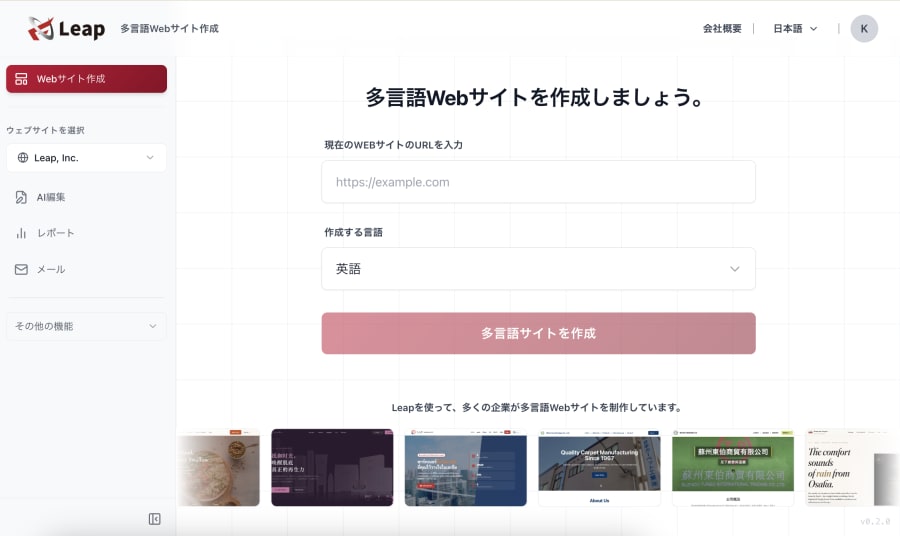
Here is how eBay compares with one option for your own store, Leap, a cross-border ecommerce tool that lets AI handle marketing too (as of November 2026).
| Item | eBay (eBay.com, no store) | For reference: Leap (your own store) |
|---|---|---|
| Pricing | No upfront fee; $0 per month (stores from $4.95 per month) | From ¥0 per month (excluding tax) |
| Fees | Final value fee of 13.6% plus $0.40 per order, international fee of 1.35%, and more (most categories) | 6% of sales (including credit card processing fees) |
| Cross-border support (languages, currencies, payments) | Listings on eBay.com are in English; proceeds are received via Payoneer | Multilingual; USD/EUR/JPY; Visa/Mastercard |
| Marketing features | eBay search, Promoted Listings (ads), store marketing tools | Automated blog creation (SEO/AIO), email newsletters, CRM |
| B2B support | Volume Pricing (quantity discounts) | Dedicated B2B cart (company-specific pricing, quote requests) |
| Built-in buyer traffic | Yes (reaches buyers on eBay) | No (you bring in your own traffic) |
Leap does not have a built-in pool of buyers like eBay, so you need to drive your own traffic to get your first orders. Its ability to customize design and functionality in detail is also more limited than platforms such as Shopify.
- eBay is a good fit if you sell one-of-a-kind items or collectibles, want to test whether your products sell overseas, or want to reach buyers without spending effort on marketing
- Your own store is a good fit if you want to communicate your brand, build repeat customers, or deal directly with overseas business buyers
You can also start on eBay and build your own store once you see which countries and products perform well. If you do not have the resources to market your own store, Leap, which lets AI handle overseas marketing, is another option.
FAQ
Q. Can individuals sell on eBay?
A. Yes, individuals can sell on eBay. eBay Japan publishes registration steps for both individuals and businesses, and you can choose either a personal or business Payoneer account. However, the Payoneer account type cannot be changed after registration, so choose carefully at the start.
Q. Are there upfront or monthly fees to sell on eBay?
A. There is no upfront fee to register, and there is no monthly fee if you do not subscribe to a store. You get up to 250 free listings per month, and the final value fee and international fee apply when an item sells (as of November 2026).
Q. Can I sell on eBay if I do not speak English well?
A. Yes, you can get started with the help of Japanese-language guides. eBay Japan publishes registration manuals in Japanese and offers free video lessons and webinars through eBay Academy for Japan. However, titles on eBay.com must be entered in English.
Q. Who pays import duties when I sell to the US on eBay?
A. For items priced under $2,500, the seller must ship DDP and cover the duties. This applies to transactions on or after October 17, 2025, and you should build the duties into your item price or shipping cost.
Summary and Key Takeaway
Selling on eBay from Japan follows a simple flow: create an account, list an item, link Payoneer, and pass the document review, all without upfront costs. In most categories, fees come to about 15% of the total sale (a 13.6% final value fee, $0.40 per order, and a 1.35% international fee).
What is easy to miss are the conditions that do not appear in the fee table: selling limits for new sellers, the DDP requirement for US orders, and the currency conversion charge change on or after December 2, 2026. Think of eBay's fees as the cost of reaching buyers around the world. Once you see which countries and products sell, build customer relationships through your own store. This two-step approach is a realistic way for small and mid-sized Japanese businesses to grow their international sales.
Leap is a cross-border ecommerce tool that lets AI handle marketing too. Just chat with it to build a multilingual, multi-currency online store and run overseas marketing such as SEO and email newsletters.
References
- eBayセラー登録ガイド - イーベイ・ジャパン
- セラーアカウント登録の流れ - イーベイ・ジャパン
- eBayセラーアカウントの設定方法 - イーベイ・ジャパン
- 【1点ずつ出品する】eBayの基本となる出品方法 - イーベイ・ジャパン
- 出品方法(アプリで出品) - イーベイ・ジャパン
- 【ポリシー:説明文について】出品商品のタイトル決めと説明文のコツ - イーベイ・ジャパン
- 出品時の注意点(出品禁止商品) - イーベイ・ジャパン
- 出品可能枠について~Selling Limit~ - イーベイ・ジャパン
- 料金について - イーベイ・ジャパン
- Selling fees - eBay Customer Service
- International selling fees for eBay Global sellers - eBay
- Optimizing your listings for Best Match - eBay
- eBay SpeedPAK - イーベイ・ジャパン
- 米国向け取引のDDP必須化について - イーベイ・ジャパン
- Pricing - Leap